

SideSlide® Multi-Screen Church Presentation for Worship & Sermons
SideSlide® is Risen Media’s patented multi-screen church presentation technology. Instead of sending the same slide to every display, you can show lyrics on one screen, artwork or sermon points on another, and a confidence screen for your pastor or worship team, all at the same time. Design immersive, multi-screen worship and sermon presentations that keep your congregation, band, and online viewers fully engaged.
No Credit Card Required
See SideSlide® and Risen Media in Action
Curious how SideSlide® actually works in a live service? Schedule a quick walk-through with our team. We’ll show you how to build multi-screen worship and sermon presentations, route content to different displays, and support both in-room and online audiences from one web-based platform.
No pressure, just a friendly demo tailored to your church setup.

What Is SideSlide®?
SideSlide® is a unique feature inside Risen Media that lets you display different content on multiple screens simultaneously. Show worship lyrics on your main screens, sermon points or images on side displays, and a dedicated confidence screen for your worship team or pastor—all controlled from a single, simple interface. It’s multi-screen church presentation made effortless, without extra hardware or complicated routing.
SideSlide® for Worship Presentations
With SideSlide® for worship, you can design a richer visual experience for both your in-person and online congregation. For example:
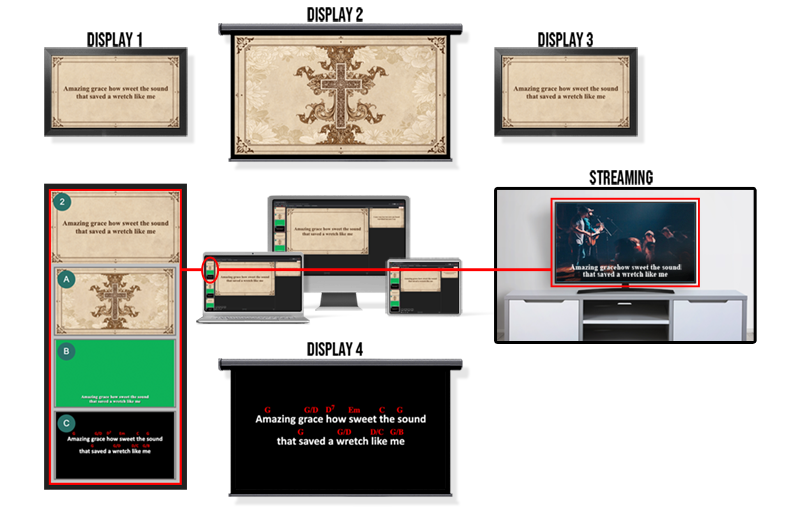
- Displays 1 and 3 show clean, high-contrast worship lyrics for the room
- Display 2 highlights a powerful image, motion background, or artwork
- Display 4 serves as the confidence screen, with lyrics and chords for your worship team
A separate streaming output sends green-screen or lower-third lyrics for your online viewers
SideSlide® turns your worship presentation into a coordinated, multi-screen worship experience that keeps everyone focused on the moment, not the technology.
This layout shows how SideSlide® can power multiple screens during a live worship set, sending different content to each display while you stay in control from one church presentation dashboard.
SideSlide® for Sermon Presentations
SideSlide® shines during sermons. Imagine a message on “Good vs. Evil” where:
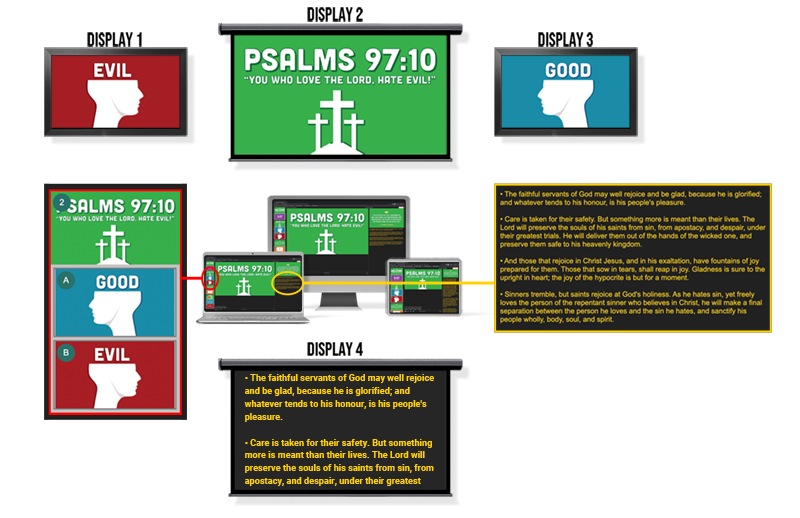
- Display 2 shows the main sermon title and key Scripture
- Display 1 shows a graphic illustrating the theme of evil
- Display 3 shows a contrasting image representing good and restoration
- Display 4 acts as a confidence screen, giving the pastor scrolling sermon notes like a teleprompter
With SideSlide®, you can present more context, imagery, and Scripture at once, helping your congregation follow the message, stay visually engaged, and remember key points long after the service ends.
Here’s a real-world SideSlide® layout used during a sermon, with multiple screens working together to support the message and keep the congregation focused.
SideSlide® in a Real Service
Watch SideSlide® in action as Senior Pastor Paul Clairville preaches a sermon on Good and Evil at Westminster Presbyterian Church in Burbank, CA. Notice how the multi-screen layout reinforces key ideas, supports the teaching moment, and keeps the congregation visually engaged from start to finish.
Show Multiple Slides at Once, Without Confusing Your Team
Use SideSlide® to show more than one slide at a time, without overwhelming your operators. One display can show a Bible verse, another can show a supporting image or graphic, and another can show worship lyrics or announcements, all synced to the same moment in the service. You’re not limited to two screens, either. Create as many SideSlides as you have displays and build dynamic, multi-screen church presentations that match your worship space and style.
Use Cases of SideSlide®
SideSlide® gives your church unlimited flexibility in how you present Scripture, worship lyrics, bilingual content, teaching points, illustrations, and livestream outputs. Whether you’re running two screens or twelve, every display can show the exact content you want, perfectly timed and controlled from one dashboard. No other church presentation software comes close.
1. Bilingual Worship & Sermons (Perfect for Multilingual Churches)
Show the same content in two languages across multiple displays:
- English text on Display 1
- Spanish text on Display 2
- Korean or Mandarin on Display 3
- Or any combination your church needs
Ideal for: multicultural congregations, translation ministries, and bilingual services.
2. Bible Verses + Explanation / Commentary
Show the Scripture reference on one screen and place commentary, explanation, or teaching points on another.
Example:
- Display 1: “John 3:16”
- Display 2: Short explanation or theological context
Perfect for deeper teaching environments.
3. Bible Verse + Supporting Image / Artwork
Bring your sermon to life by pairing Scripture with visuals.
Example:
- Display 1: The verse
- Display 2: A thematic image, illustration, or motion background
4. Worship Lyrics + Visual Backgrounds
Classic, popular SideSlide flow:
- Screens 1 & 3: Clean lyric slides
- Screen 2: A cinematic visual or motion background supporting the moment
- Screen 4: Confidence screen with lyrics + chords
5. Online Stream + In-Person Experience
Send a completely different output to your livestream:
- In-room: full-screen lyrics
- Online: green-screen lower thirds
- Stage: confidence screen
All from one presentation.
6. Teaching With Multiple Supporting Slides
Pastors and speakers can present layered content:
- Main point on one screen
- Quote or sub-point on another
- A chart, timeline, or map on a third
Great for expository teaching, Bible classes, and conferences.
7. Kids Ministry & Youth Services
Run fun, dynamic visuals:
- Teaching point on one screen
- Images, activities, or memory verse visuals on another
See SideSlide® and Risen Media in Your Context
Want to explore how SideSlide® could work with your sanctuary, displays, and livestream setup? Schedule a quick walk-through with our team. We’ll help you map SideSlide® to your rooms, design a multi-screen worship and sermon flow, and show how easy it is for volunteers to run a full service.
No pressure, just a practical demo tailored to your church’s needs.
Frequently Asked Questions
1. What is SideSlide® and how is it different from other church presentation tools?
SideSlide® is Risen Media’s patented multi-screen presentation technology that lets you show different content on multiple displays at the same time. Instead of sending the same slide to every screen, you can route worship lyrics, sermon points, images, and confidence screens independently, all from one simple interface. This makes it easy to create immersive, multi-screen worship and sermon presentations without extra hardware or complex routing.
2. What kind of screens and hardware do I need to use SideSlide®?
ideSlide® works with virtually any TV, projector, LED wall, or multi-display setup. You can connect your computer directly to your screens or present completely wirelessly using the Risen Media Display App on devices such as Amazon Fire TV Stick, Google TV / Chromecast, or any modern Android-based streamer.
Because of this technology, you don’t even need a computer physically connected to the screens. Your presentation runs from Risen Media in the cloud, and each display receives its assigned SideSlide® content over your network. This makes multi-screen church presentations simple to set up, even in spaces where cabling or hardware limitations would make a traditional setup difficult.
3. Can volunteers and non-technical users run a SideSlide® service?
Yes. SideSlide® is built into Risen Media’s web-based church presentation software, which is designed for volunteers and small teams. You can pre-build your SideSlide® layouts in advance, then run the entire worship service or sermon from a clean, familiar control screen. Volunteers simply click through slides, and SideSlide® automatically sends the right content to each display.
4. Does SideSlide® work for livestream and online church services?
Absolutely. With SideSlide®, you can send one layout to your in-room screens and a separate layout to your streaming output. For example, your sanctuary displays can show full-screen lyrics or artwork, while your livestream output uses green-screen or lower-third lyrics. This helps you create a tailored experience for both in-person and online viewers without building separate presentations.
5. Can I use SideSlide® for both worship and sermons in the same service?
Yes. SideSlide® is designed to support your entire service, from pre-service loops and worship sets to sermons, prayers, and announcements. You can create SideSlide® layouts for worship lyrics and confidence screens, then switch to sermon layouts with verse slides, key points, images, and pastor notes. Everything runs from the same Risen Media presentation, so your tech team doesn’t have to juggle multiple apps or files.